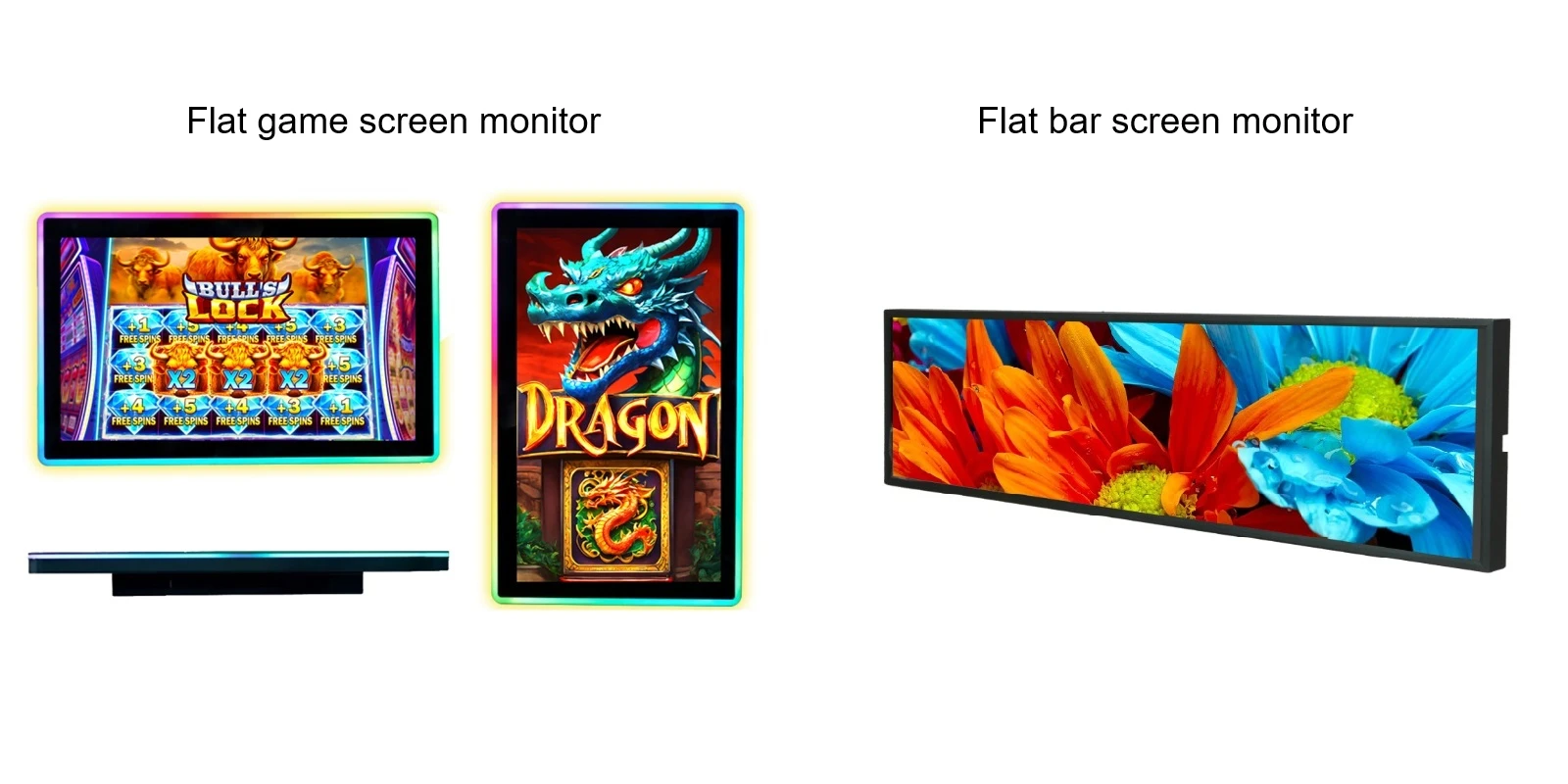
Application Scenarios,Commonalities and Differences between Flat Game Screen Displays and Flat Bar Screen Displays
Leave a message
Application Scenarios,Commonalities and Differences between Flat Game Screen Displays and Flat Bar Screen Displays
1. Commonalities
A. Display Principle:
Both use LCD or LED display technology, emitting light through pixels to form images, supporting brightness, contrast, and color adjustment.
B. Planar Form:
The screens are all flat, without curvature, and the images have no geometric distortion, suitable for presenting straight lines and standard proportion content.
C. Interfaces and Control:
Both support HDMI, DP, etc. for video input, and content can be updated through the system or software. Some support multi-screen docking or interactivity.
D. Cross-Application Scenarios:
Both can be used for information display and interaction. Game screens can play videos or advertisements, and bar screens can display simple animations or scrolling text.
2. Differences
The core distinction lies in the purpose and form: Game screens aim for high refresh rate, low response time, and wide color gamut, while bar screens aim for long strip display, high brightness, and industrial-grade reliability. Although both are flat display devices, their design goals are completely different.
| Dimensions | Flat Game Screen Display | Flat Bar Screen Display |
| Screen Ratio | 16:9 or 21:9, close to square or widescreen | Long and wide ratio, such as 32:9 or even longer, in a slender strip shape |
| Core Parameters | Refresh rate above 144Hz, response time 1ms, supports G-SYNC/FreeSync | High brightness, high contrast, wide temperature operation, typically 60Hz refresh rate |
| Picture Requirements | Correct colors, dynamic clarity, no tearing or lag | Uniform brightness, long-distance visibility, smooth content scrolling |
| Typical Applications | E-sports, 3A games, audio-visual entertainment | Subway announcements, shelf advertisements, bank windows, industrial instruments |
| Installation Method | Desktop stand, adjustable and rotatable | Embedded or wall-mounted, suitable for narrow spaces |
| Environmental Adaptability | Indoor environment, emphasizing picture quality and experience | Wide temperature (-20℃~70℃), high brightness, anti-interference, suitable for outdoor or harsh environments |
| Price | Mid-to-high end, performance determines price | Depends on size and brightness, industrial-grade is more expensive |
3. Application Scenarios
(1) Application Scenarios of Flat Game Screen Displays
The core of flat game screen displays is high refresh rate, low response time, and anti-tearing technology. They are mainly designed for e-sports and gaming experiences.
A. Competitive Games (FPS/Shooting): The flat screen displays no distortion in the game interface, and the aiming is precise. They are suitable for games like CS2 and Valoran that require quick reactions. High refresh rate (240Hz or higher) and 1ms response time can effectively reduce ghosting, making the operation more responsive.
B. 3A Games and Single-player Games: 4K resolution, wide color gamut, and HDR can present more detailed picture details, combined with high refresh rate, making scene transitions smoother.
C. Office/Design with Game Integration: The flat screen has straight lines without bending, and there is no visual deviation when handling tables, codes, or editing images, making it suitable for people who spend a lot of time in front of the screen and occasionally play games.
D. E-sports Training and Competition: Professional players need stable and precise picture output. Flat screens with "rules" and "precision" are the first choice.
(2) Application Scenarios of Flat Bar Screen Displays
Bar screen displays are long and narrow, with a wide aspect ratio. The core is to display dynamic information or advertisements in a narrow space, usually used in commercial and public settings.
A. Retail and Shopping Centers: A bar is embedded in the shelf layer, playing the prices, origin, and promotion information of the products. It does not compete with the physical products but can attract customers' attention and increase the probability of purchase.
B. Transportation Hubs: As announcement screens in subways and bus stations, they display arrival information, transfer routes, and can also play multimedia content such as news, weather, and advertisements.
C. Banks and Hospitals: Queueing for registration, financial information display, doctor introductions and appointment guidance, bar screen can provide timely and accurate service information.
D. Smart Home and High-end Appliances: Embedded in high-end refrigerators, range hoods, integrated stoves, etc., as a horizontal display control panel or information screen.
E. Medical Equipment: Small portable medical devices, pump equipment, etc., used for displaying parameters and status.
F. Exhibition Halls and Brand Promotion: Smart agriculture exhibition halls, corporate image walls, etc. The bar screen is placed next to the physical display cabinets, broadcasting product traceability, certification information, and cooperating with the data screen to form a complete narrative line.
4. Purchase Reminders
- Game Screen Displays: Focus on refresh rate, response time, panel type (IPS/TN/OLED), and whether G-Sync/FreeSync support. Size and resolution depend on the desktop space and graphics card performance.
- Bar Screen Displays: Focus on installation location (in cabinets, on shelves, on walls), brightness (additional shading is needed when placed near windows), whether split-screen display and remote content update are supported.